> For the complete documentation index, see [llms.txt](https://hash7-gitbook.gitbook.io/en/llms.txt). Markdown versions of documentation pages are available by appending `.md` to page URLs; this page is available as [Markdown](https://hash7-gitbook.gitbook.io/en/affiliate-program/3.2-how-can-i-invite-a-partner.md).
# 3.2 How can I invite a partner?
There are two ways to invite partners to Hash7.
**Method 1: For partners with the Hash7 app already installed**
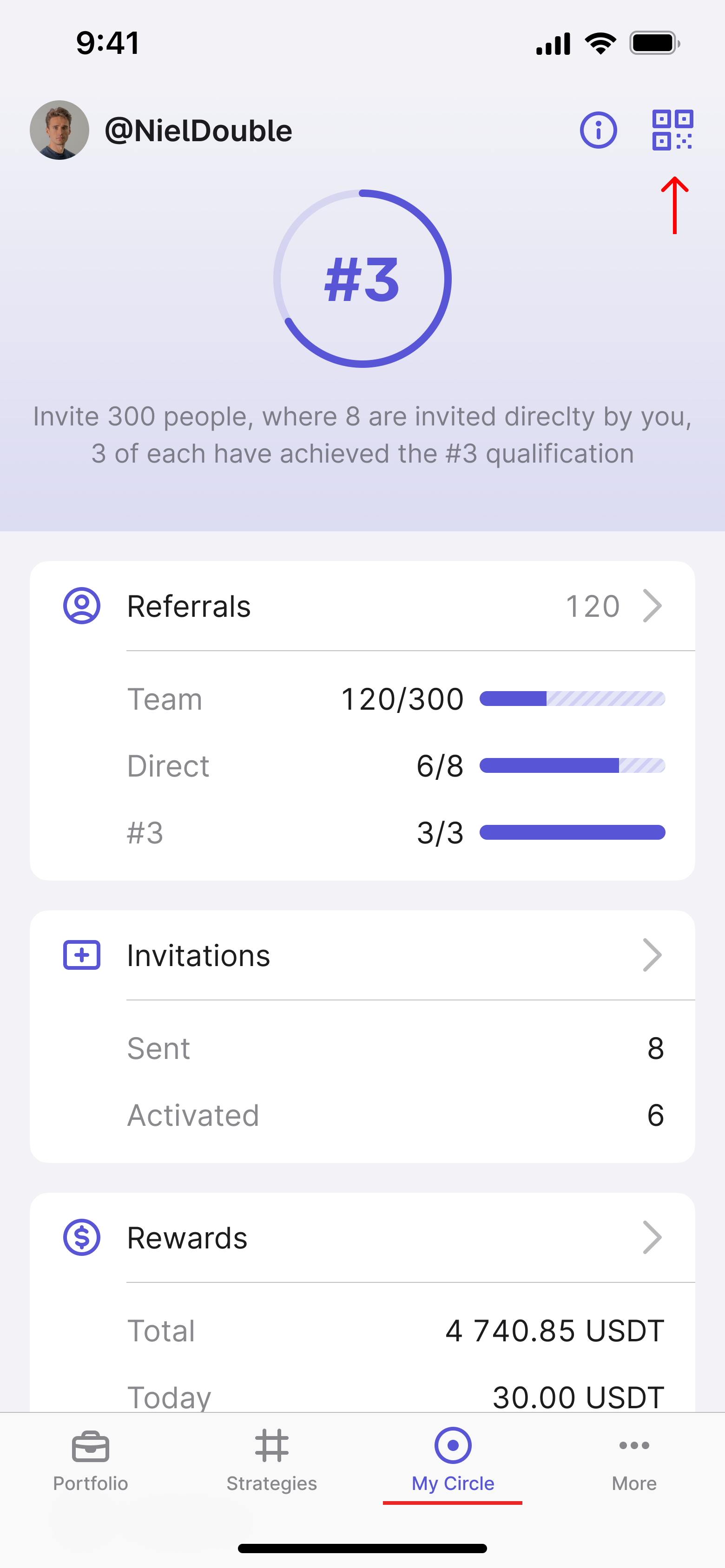
In order for your partner to enter the app, you need to share your referral or QR code with them. To do this, you need to open the Hash7 app, go to the ''My Circle'' tab and click on the QR code icon in the top right corner.
Once clicked, a window will open containing your individual QR code, referral code and referral link. You can easily share this information by copying and sending the referral code to your partner you want to invite, or by showing them the qr code to scan.
**Method 2:** For partners who do not have the Hash7 app installed
It is important to note that if your affiliate does not have the Hash7 app - it is **your referral link that needs to be shared.**
When clicking on your referral link, your partner will be opened a window where the field with your referral code will be automatically filled in.
Next, your partner needs to click on the ''Continue'' button:
On the next tab, your partner needs to complete the following steps:
1. Enter an email to register;
2. Provide a password;
3. Select the country of location;
4. Check the box agreeing to the terms of use and privacy policy;
5. Click on the "Register" button.
Next, your partner needs to download the app itself by clicking on one of the buttons to install, depending on their operating system.